The billing cycle at a glance
How a quotation turns into an order confirmation, delivery notes and invoices — and what docket does automatically along the way.
Every project bills its work in cycles. A cycle starts with a quotation and ends with the final invoice; everything in between belongs to it. You find all cycles of a project in its Accounting tab.
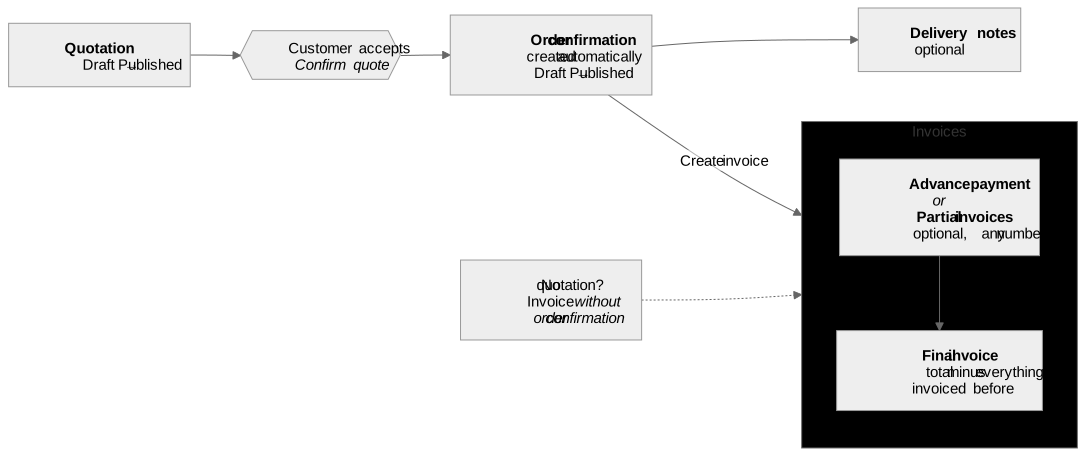
From quotation to order confirmation
- Write the quotation and publish it once it's final. Publishing locks its content — only drafts can be edited. Need to change it? Back to edit mode turns it into a draft again.
- The customer accepts. Use Confirm quote on the quotation. You can attach the customer's signed confirmation (a PDF up to 2 MB) and a note.
- docket creates the order confirmation for you, with the quotation's positions. Confirming again later updates it instead of creating a second one. Publish it when it's ready to go out.
docket doesn't email documents to your customer itself: open or download the PDF from the document and send it the way you always do. Only send published documents.
Delivery notes
Optional. Create them from the order confirmation (Create delivery note) — as many as you deliver in parts. They take over the order confirmation's content.
Invoices
Create invoices from the order confirmation (Create invoice). Which types you can create depends on what the cycle already has:
| Type | When |
|---|---|
| Advance payment | Before the work: a percentage or a fixed amount of the total. Not combined with partial invoices. |
| Partial invoice | Bills only the positions you select. As many as you need. Not combined with an advance payment. |
| Final invoice | Bills the rest: the full total minus everything invoiced before in this cycle — the invoices that went out; a draft doesn't count. After it, the cycle takes no more invoices. |
No quotation for this job? Create an invoice without order confirmation — it can also take the tracked time as positions.
docket keeps an eye on the amounts: it warns when the invoices of a cycle exceed the quotation total, and when an advance payment or partial invoices already cover all of it, offers to convert the invoice into the final one.
An invoice's life
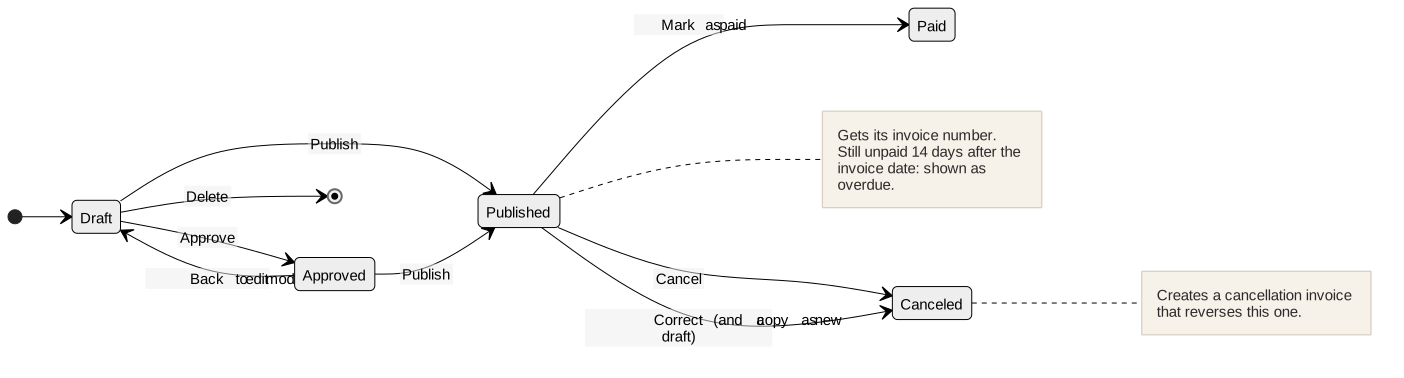
- Publishing gives the invoice its number and makes it final. Project Managers prepare invoices and may delete a draft; publishing is Admin-only.
- Before it has a number (draft or approved) an invoice is still yours to change: an approved one goes back to edit mode, a draft can be deleted.
- Correct — spotted a mistake after publishing? A published invoice isn't edited again; that's how invoices have to be kept. Correct cancels it and opens a copy as a new draft in the same billing cycle: fix it there, publish both the cancellation invoice and the corrected invoice (each gets its own number), and send your customer both.
- Mark as paid when the money arrives, optionally with the payment date.
- Canceling never deletes an issued invoice: docket creates a cancellation invoice that reverses it figure for figure and gets its own number when published. Only published invoices are canceled — before that there's nothing to reverse.
- Once the final invoice is out, the invoices before it stay as they are: to cancel an advance payment or partial invoice then, cancel the final invoice first, then the earlier one, and issue a new final invoice. That way the final invoice your customer has never changes. Without a final invoice, any of them can be canceled — the final invoice later bills what a canceled one had billed.
- A published invoice that is still unpaid 14 days after its invoice date counts as overdue.
The cycle at a glance in your project list
Each cycle shows up in the projects list as a coloured dot (Project Managers and Admins only), so you can see where billing stands without opening the project. You can filter the list — and the Forecast — by it.
| Status | Meaning |
|---|---|
| Quote draft | The quotation is still being written. |
| Quote sent | The quotation is published. |
| Quote confirmed, awaiting invoice | The customer accepted; nothing invoiced yet. |
| Invoice open | A published invoice waits for payment. |
| Invoice overdue | A published invoice is unpaid 14 days after its invoice date. |
| Paid | An invoice of the cycle is paid. |
| Canceled | The quotation — or every invoice of the cycle — was canceled. |
Related
- The quotation & invoice editor — phases, positions, services and the totals in detail.
- External costs — supplier invoices and how they reach the quotation.
- User roles — who may do what.